Trend Filter
Trend filter configuration for improved signal accuracy
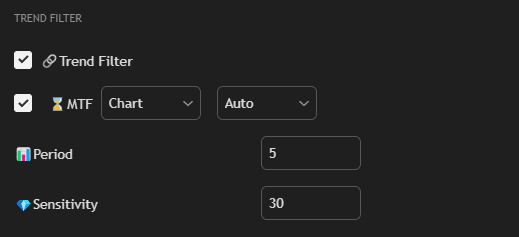
Settings
Check box Trend Filter
Enable the filter.
Check box Trend Timeframe
Enable multi-timeframe analysis.
Trend Timeframe Mode
Timeframe selection mode for trend analysis:
- Auto — the strategy automatically selects the optimal timeframe above the period specified by the user on the chart. This promotes more effective strategy operation, as trend analysis is performed on a higher timeframe.
- Manual — manual timeframe selection for trend analysis.
Trend Timeframe
Timeframe for trend analysis. In Manual mode, you can select the timeframe manually. In Auto mode, the strategy automatically selects the optimal timeframe above the current chart.
Period
Analysis period.
Sensitivity
Sensitivity. The higher, the stricter the filtering.
Usage
Trend Filter helps:
- Filter out false signals against the trend
- Increase entry accuracy
- Improve the ratio of profitable to losing trades
Tip: Multi-timeframe trend filter is recommended to use almost always, because increasing the timeframe for trend determination is the foundation of trading. We need to focus on the global trend, because the trend is your friend (trend is your friend). For volatile markets (e.g., cryptocurrencies), try higher timeframes (4H, 1D) for Trend Filter to filter out false signals. Auto mode automatically selects the optimal timeframe for trend analysis.