Risk Management
Capital and risk management
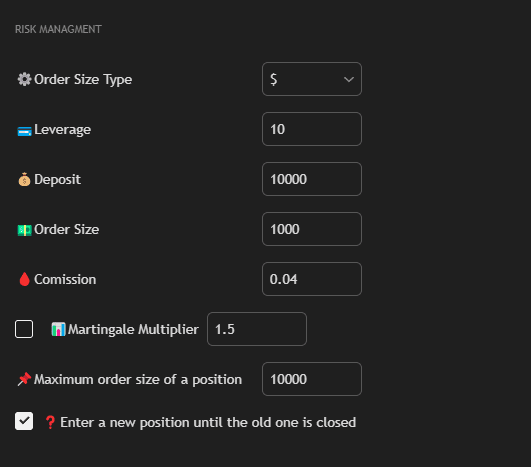
Settings
Order Size Type
Select the order size calculation type:
- $: Fixed amount (e.g., $100).
- % Deposit: Percentage of deposit.
Leverage
Leverage level.
Deposit
Your deposit size.
Order Size
Fixed trade volume (for % mode — specify as percentage of deposit, for $ — in USD).
Use Martingale
Enable martingale strategy.
Martingale Multiplier
Multiplier for increasing position size using the Martingale strategy. After a losing trade, position size increases by the specified multiplier.
Maximum Order Size of a Position
Maximum position size limit when martingale is enabled. The strategy will not open a position larger than the specified size, even if a series of losing trades continues.
Reverse Position
Allow opening a new position before closing the old one.
Recommendations
⚠️ Warning: Use Martingale only with a small deposit and limit the maximum position size through Maximum Order Size of a Position.
Risk Management:
- Set a reasonable position size (usually 1-5% of deposit)
- Use maximum position size limitation
- Be careful with martingale — it can significantly increase risks