Signal Settings
Main indicator settings for signal generation
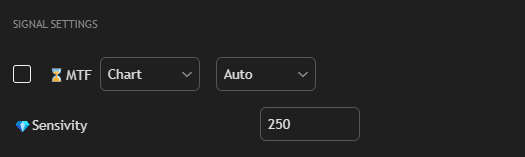
Settings
Check box Multi-Timeframe
Enable multi-timeframe analysis.
Multi-Timeframe Mode
Timeframe selection mode for signal generation:
- Auto — the strategy automatically selects the optimal timeframe above the period specified by the user on the chart. This promotes more effective strategy operation, as searching for signals on a higher timeframe leads to increased accuracy of the signals themselves.
- Manual — manual timeframe selection for signal generation.
Timeframe
Timeframe for signal generation. In Manual mode, you can select the timeframe manually. In Auto mode, the strategy automatically selects the optimal timeframe above the current chart.
Sensitivity
Signal sensitivity. Higher values reduce the number of trades but increase accuracy.
Optimization
Sensitivity is one of the most important parameters. It is recommended to:
- Check the Best Sensitivity value in Info Table
- Set this value in the Sensitivity field
- Test on historical data
- Adjust manually if necessary
Tip: Multi-timeframe analysis for the signal section is recommended to use sometimes. This is convenient when you are working on very small timeframes (approximately second-based) and want more accurate trades, because searching for signals on a higher timeframe leads to increased accuracy of the signals themselves. Auto mode automatically selects the optimal timeframe for signal generation.