Tables Settings
Analytics tables display configuration on the chart
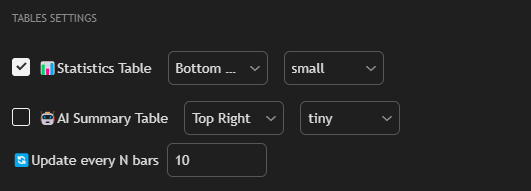
Settings
Statistics Table
Enable display of the statistical table with main trading strategy metrics.
Position: Table position on the chart (Top Left, Top Right, Bottom Left, Bottom Right).
Size: Table size (tiny, small, normal, large, huge).
AI Summary Table
Enable display of the table with AI analysis and strategy summary.
Position: Table position on the chart (Top Left, Top Right, Bottom Left, Bottom Right).
Size: Table size (tiny, small, normal, large, huge).
Update every N bars
Table update frequency. Specifies the number of bars after which recalculation and data update in tables occurs.
Usage
Tables Settings allow:
- Configure analytics display on the chart
- Control data update frequency
- Optimize resource usage through update frequency configuration
Tip: To reduce performance load, increase the "Update every N bars" value. For more up-to-date information, set a smaller value (e.g., 1 or 5).